
Firebase can help an individual developer or a small team ship an app without first building and operating every backend service. It provides managed building blocks for data, sign-in, file storage, messaging, and app monitoring. That convenience can shorten a first release, but it does not remove the need to make security, cost, and data-model decisions.
When planning mobile app development, treat the backend as one part of the product rather than a complete architecture by itself. Firebase is a backend-as-a-service (BaaS) platform: its client SDKs connect apps to hosted services, while you configure access and choose which services fit your use case.
The image below is retained from the original article. It illustrates an older Firebase product lineup and should not be used as a current feature or pricing list.
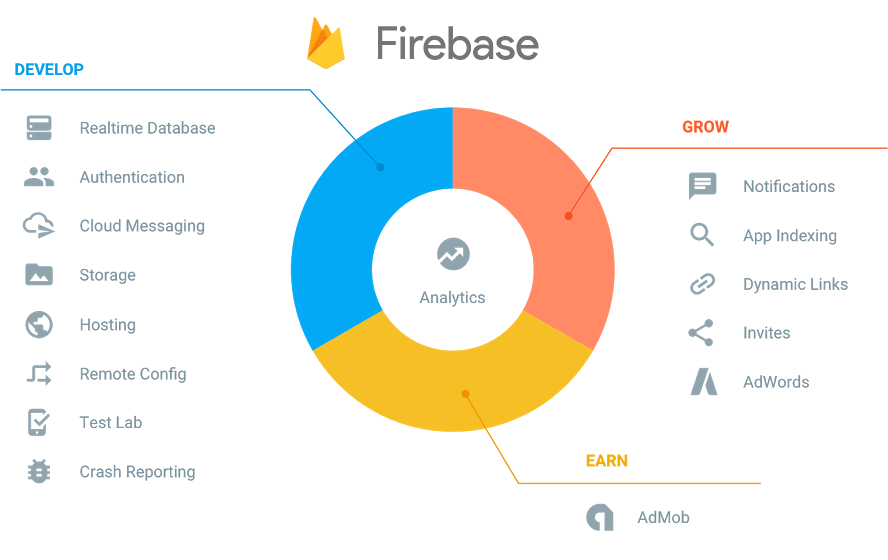
What Firebase can provide
Firebase is a collection of products, not one database or a ready-made application server. Common building blocks include:
- Sign-in: Firebase Authentication supports common identity flows. Authentication establishes who a user is; it does not by itself decide which records that user may read or change.
- App data: Cloud Firestore stores documents in collections and supports queries across that model. Realtime Database stores data as a JSON tree and synchronizes changes. Both support realtime client updates; compare their query, scaling, and data-model tradeoffs before choosing. Realtime Database also provides a presence pattern for tracking connection state.
- Files: Cloud Storage for Firebase can store user-uploaded content such as photos. Set file access rules and check the service's current billing and plan requirements before launch.
- App operations: Firebase Cloud Messaging delivers cross-platform messages; Remote Config lets you manage app parameters without shipping a new binary; Crashlytics helps investigate crashes; and Google Analytics for Firebase reports on app usage. Test Lab and App Distribution can also support testing and release workflows.
The right combination depends on the app. A small product may use Authentication, one database, and Storage, but it does not have to adopt every Firebase service.
Choosing a database
Firebase's Firestore and Realtime Database comparison is a useful starting point:
- Consider Cloud Firestore when your data fits documents and collections and the app needs queries across records.
- Consider Realtime Database when the data is naturally a simpler JSON tree or a feature depends on its realtime synchronization and presence capabilities.
These are starting points, not universal performance rules. Sketch the records and queries the app needs, then prototype representative reads, writes, and live updates. Check the pricing model for that workload too; a frequently updated feed or chat can behave differently from a mostly read-only catalogue. Both choices still need carefully designed Security Rules.
Security still belongs in your design
Firebase SDKs let many apps connect directly to hosted services, so a separate custom server is not required for every read or write. Direct access is safe only when the backend is configured to enforce the intended permissions:
- Use Firebase Security Rules to authorize database and file operations. Connect rules to authenticated identities where appropriate, validate the data clients may submit, and avoid broad public read or write access.
- Treat App Check as an additional abuse defense. It helps verify requests come from an attested app or device, but it does not replace Authentication or Security Rules.
- Put privileged operations, private credentials, and integrations that require secrets behind trusted server code, such as Cloud Functions. Never rely on a key or condition hidden in the mobile client as an authorization boundary.
- Test rules and flows before release, including unauthenticated requests and users attempting to access one another's data. The Firebase Local Emulator Suite lets you exercise supported services without using production data.
Costs and tradeoffs
Firebase has a no-cost Spark plan and a pay-as-you-go Blaze plan, but the included usage and billing rules vary by product. Storage, database reads and writes, network transfer, and other usage can have different limits or charges. Check the current Firebase pricing for the exact services and regions you plan to use; do not treat a free quota or a historical “unlimited” claim as a spending guarantee. Google Cloud budget alerts can notify you about costs, but they do not cap spending. Estimate active users, request frequency, data size, and file downloads before launch, and review actual usage after a small rollout.
Firebase is a reasonable fit when you value managed infrastructure, client SDKs, and a quick path to a working app. It may be a poor fit if your data needs a relational model, you require tight control over every backend component, or switching providers later would be costly. Firebase-specific APIs and security rules can make migration work, so document your data model and export needs early.
Check legacy features before using them
Some services named in older Firebase guides have changed or are no longer available. In particular, Firebase Dynamic Links shut down on August 25, 2025; its hosted links no longer work. For app routing, evaluate Android App Links and Apple Universal Links, or choose a maintained provider if you need additional deferred-link behavior. Do not assume these options reproduce every Dynamic Links feature.
Firebase is most useful when its managed services match your app's requirements and you are prepared to configure and monitor them. Start with the smallest set of services that solves a real need, secure it with server-enforced rules, and revisit the pricing and product documentation as your usage grows.
For the product overview and service-specific setup guides, see the Firebase documentation.
